
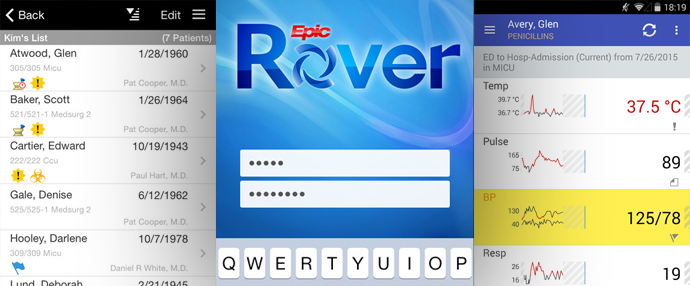
Epic Rover puts selected Epic workflows on supported handheld devices. With the right configuration, clinicians can use it for barcode medication administration, specimen collection, vital signs, task review, chart access, and other work at the bedside.
The healthcare organization deploys and manages Rover; it is not a stand-alone consumer app. What users can do with it depends on the Epic build, mobile devices, security policies, and clinical workflows in place.
What Does Epic Rover Do?
Rover gives authorized users access to selected Epic functions where the work happens. That can mean fewer trips to a workstation and documentation completed closer to the patient.
Common Rover workflows may include:
- Reviewing patient lists and selected chart information
- Confirming patient identity by scanning a wristband
- Barcode medication administration
- Specimen collection and labeling
- Recording vital signs and selected assessments
- Reviewing or completing assigned tasks
- Documenting selected bedside activities
- Finding and contacting members of the care team
The exact functions available depend on the health system’s licensed capabilities, build, role-based security, devices, and deployment decisions.
Barcode Medication Administration With Rover
One common use of Rover is barcode medication administration. A configured workflow can allow a clinician to scan the patient’s wristband and medication barcode before documenting administration.
Barcode scanning supports patient-identification and medication-verification processes, but it does not replace clinical judgment or local medication-administration policies. Organizations must design workflows for exceptions, damaged barcodes, unavailable devices, urgent situations, and downtime.
For staff to trust the workflow, the devices, scanners, wireless coverage, medication barcodes, authentication, training, and support all have to work together. Frequent scanning problems invite workarounds that defeat the purpose of the process.
Mobile Specimen Collection
Rover can also support selected specimen-collection workflows. Depending on configuration, a phlebotomist, nurse, or other authorized user may be able to:
- Review a collection list
- Confirm patient identity
- Scan a patient wristband
- Print labels from a mobile printer
- Scan specimen labels
- Record collection details
- Update the status of a specimen
Mobile collection must be tested end to end with the laboratory information system, orders, printers, scanners, specimen containers, transport processes, and downtime procedures.
Organizations using Epic Beaker should involve laboratory, nursing, technical, and patient-safety teams in the design.
Mobile Documentation and Task Management
Rover may provide access to selected patient information, documentation activities, and task lists. Mobile workflows should focus on tasks that are useful and safe to complete on a handheld device.
Not every workstation workflow belongs on a small screen. Teams should watch people use the device in real conditions, measure completion time and scanning success, and look for tasks that become awkward while wearing gloves, moving between rooms, or handling other bedside responsibilities.
Epic Rover Implementation Considerations
An effective Rover rollout requires coordinated decisions about technology, workflow, security, and support.
Device Strategy
Determine which devices, scanners, cases, charging stations, and accessories are supported. Decide whether devices will be shared, assigned, or used through an approved bring-your-own-device model.
Mobile-Device Management
Establish procedures for enrollment, configuration, application updates, authentication, remote management, lost devices, replacement, and retirement.
Wireless Coverage
Test Wi-Fi in patient rooms, medication areas, hallways, laboratories, elevators, and every other place where staff will use Rover. A clean conference-room test says little about bedside reliability.
Barcode Scanning and Printing
Validate patient wristbands, medication packages, specimen labels, mobile printers, label stock, scanner performance, and exception workflows.
Security and Privacy
Use role-based access, device protections, appropriate authentication, timeout settings, monitoring, and procedures for lost or shared devices. Screen visibility and physical device handling should be included in workflow reviews.
Infection Control
Define approved cleaning products and procedures for shared devices and accessories. Include cleaning expectations in training and operational ownership.
Training and Adoption
Train users on the complete workflow, not just the application screens. Include scanning, device care, charging, troubleshooting, exceptions, escalation, and downtime.
Support Model
Define who supports devices, connectivity, printers, access, application build, and clinical workflow questions. Users should not have to guess which team owns an issue.
Measuring Rover Adoption
Possible measures include:
- Active users by role or department
- Mobile workflow completion
- Barcode scan compliance
- Failed scan or label-print events
- Device availability and replacement rates
- Help-desk volume
- Workflow completion time
- User feedback
- Medication or specimen exceptions
Numbers need clinical and operational context. More mobile activity is not automatically better if users are running into delays or completing tasks that do not belong on the device.
Frequently Asked Questions About Epic Rover
Can anyone download and use Epic Rover?
No. Rover must be deployed and configured by an organization using Epic. Users need approved devices or device access, appropriate credentials, and role-based permission.
Does Rover replace Epic on a workstation?
No. Rover provides selected mobile workflows. Many complex documentation, review, configuration, and administrative tasks still require a workstation or another approved Epic application.
Does Rover work with Epic Beaker?
Rover can support selected mobile specimen-collection workflows connected to Beaker, depending on the organization’s configuration.
Is Rover only for nurses?
No. Potential users can include nurses, phlebotomists, therapists, technicians, and other authorized staff. Available workflows vary by role.
What is the biggest risk in a Rover rollout?
There is no single risk. Common problems include unreliable wireless coverage, poor device availability, scanning failures, unclear support ownership, weak training, and workflows that do not reflect bedside reality.
Explore Epic consulting services or search healthcare IT opportunities.